Unswear Font: Mastering the Black Metal Aesthetic
Visual Characteristics and Aggressive Appeal
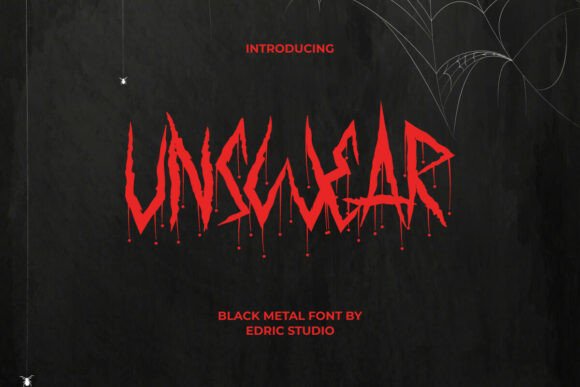
When a project demands an atmosphere of mysticism, brutality, and raw power, typography becomes your primary weapon. Unswear is not just a typeface; it is a visual manifesto for the dark and aggressive side of design. As a premium display font, it captures the essence of black metal horror through its distinctive letter design. The characters are forged from sharp, harsh brush strokes, creating a texture that looks hand-drawn yet mechanically precise. This is not a clean, geometric sans serif font; it is a creative font built on chaos and intensity.
The defining features of Unswear include the symbolic blood drops integrated into the letterforms, which add a layer of visceral horror to the text. While it shares some atmospheric similarities with gothic styles, it is important to note that Unswear is distinct from traditional blackletter fonts. Its characters are not strictly gothic in the medieval sense; instead, they lean into a modern typography interpretation of extreme metal culture. The result is a typeface that feels both ancient and contemporary, perfectly suited for conveying a sense of dread and power without relying on cliché.
Strategic Applications for Modern Creators
Understanding where to deploy a strong display font like Unswear is crucial for maintaining design integrity. This typeface excels in environments where readability at small sizes is secondary to visual impact. For graphic designers working on album artwork and covers, Unswear is an obvious choice, instantly communicating the genre and tone of the music. It creates an immediate visual hierarchy on posters and promotional materials, ensuring the headline grabs attention before the viewer even reads the copy.
Beyond the music scene, the font’s utility extends into various commercial and personal projects. It is an excellent asset for brand identity in niche markets. For example, clothing brands targeting the alternative or streetwear scene can use Unswear for logos and fabric prints to establish a gritty, authentic vibe. Similarly, it serves well in the entertainment industry. Game developers and filmmakers can use it for titles and key art to set a horror or fantasy atmosphere immediately. Even for seasonal projects, such as Halloween-themed designs or spooky merchandise, this font provides the necessary edge without needing extensive modification.
Practical Use Cases for Maximum Impact
- Editorial and Publishing: Use it for striking headers in magazines or blogs that cover alternative culture, extreme sports, or horror fiction.
- Digital Presence: Apply Unswear to website hero sections or social media graphics to stop the scroll. It works particularly well for YouTube thumbnails or Twitch stream overlays where aggression is part of the brand.
- Packaging and Labels: For craft breweries, hot sauce brands, or artisanal products with a "dark" theme, this font adds shelf appeal and communicates the product's intensity.
- Merchandise: It translates beautifully onto fabric, making it ideal for T-shirts, hoodies, and tote bags.
Typography Pairing and Hierarchy
One of the most common mistakes with aggressive display fonts is poor pairing. Because Unswear is so visually dense and textured, it requires a balancing act. You should avoid pairing it with other decorative fonts, such as a busy script font or a complex handwritten font, as this will create visual noise that is impossible to read.
The best strategy is to contrast the chaos of Unswear with a clean, neutral foundation. A geometric sans serif font is the perfect partner for body text. Look for fonts with simple letterforms and generous spacing to ensure legibility. Alternatively, a sturdy serif font can provide a classic, authoritative counterpoint to the modern brutality of Unswear. When designing, use Unswear exclusively for display purposes—titles, headers, and logos—and delegate all long-form text to your secondary typeface. This approach maintains the aggressive aesthetic while ensuring your message remains accessible to your audience.
Technical Execution and Customization
Unswear is designed as a complete professional tool, offering a full basic set of uppercase and lowercase letters, numbers, punctuation, and symbols. However, to truly unlock its potential, you need to look at the technical features. The font includes optional alternates that allow you to customize the look of specific letters, preventing repetition in longer words and enhancing the handcrafted feel.
To access these alternate glyphs, you must use a program that supports OpenType features, such as Adobe Illustrator, InDesign, or Photoshop. This capability is vital for logo design and branding, where uniqueness is paramount. By swapping out standard characters for alternates, you can create a bespoke logotype that feels truly one-of-a-kind. Furthermore, Unswear supports multilingual characters, making it a versatile choice for global brands or international metal concert promotions. It installs seamlessly on both Windows and Mac operating systems, integrating smoothly into your existing workflow.
Evaluating Fit and Licensing
Before integrating Unswear into your next project, take a moment to evaluate the context. Ask yourself if the project requires a heavy emotional weight. If you are designing a corporate report or a medical brochure, this font is likely the wrong fit. However, if you are aiming for a target audience that appreciates counter-culture, intensity, or horror, it is the perfect tool.
Consider the medium. While it performs flawlessly in digital environments, high-resolution printing will showcase the intricate brush strokes and blood drop details best. Always test your font pairings in the specific environment where the design will live—view a mockup of the website or a print proof of the poster. Finally, ensure you have the correct commercial license for your usage, whether it is for a single client project or a mass-produced product line. When used with intention, Unswear does not just display text; it projects an attitude, transforming standard design assets into powerful visual statements.